Home | News | Android

Archive

. . . . . . . . . . . . . . . . . . . . . . .
Showing posts with label Computer and Laptop. Show all posts

Sony Polishes Netbook Series P

Thursday, May 13, 2010

Sony Polishes Netbook Series PAssembler and netbook competition amid noisy uproar iPad success, re-polish Sony Vaio Series P. Re-polishing a mini version of the portable computer is expected able to transfer the user's interest in Sony who are tempted by iPad, equal or Smartbook.

Maximum PC site to write, Sony deliberately fixing the P series which measures 8 inches with a loyal Sony consumer expectations are still loyal. Sony still believe in the ability of the P series and provide additional improvements in a number of features to support mobile users.

Whatever Sony's improved? One was the presence of the touchpad and mouse Botton on the side of the screen. The existence of this feature is expected to provide comfort to the user when using two hands to hold.

Aroma phone feel so, when Sony gives features of the global positioning system (GPS) and compass digital. Both features allow the P series were used as navigational tools. At least, this feature can reduce the user wishes to think moving to Sony for another vendor.

Scented phones that also features pinned on the Series P is Accelometer. This feature allows users to change my website or see the next picture with just enough wiggle. This feature can also be enabled on your browser as a form of "forward" and "back" pages. Finally, Sony equip 3G modem on its appliances.

Problem pricing, predictable considering the addition of features will give effect felt in the pocket.
In previous series, Series P banderole can reach millions of rupiah. Alter the version most likely will exceed 10 million rupiah and bergangung specifications. The plan, Sony Vaio P Series will be launched in June 2010.

Here P Series General Specifications:
- Intel Atom Processor Z540
- Operating System Windows 7 Home
- RAM + 2GB DDR2 SDRAM Memory
- 64 GB SSD
- Screen size 8-inch (1680 × 768)
- Weighing just 600 grams, measures 120 x 19.8 x 245 mm
- Battery: Up to 5 hours


Labels:

New Intel processors and MeeGo The goal Android

Thursday, May 6, 2010

Intel Atom processor-based platform the second generation of the newly launched Tuesday (05/04/2010), aiming at the market of smartphones and tablet computers is rapidly growing. Not without Intel's capital into the market of smartphones and tablets for at least two software platforms already mastered, Android and MeeGo (combination of Intel and Nokia Maemo Moblin).

"As one of the founders of the Open Handheld enggota Allaince (OHA), Intel has teamed up with Google over the last few years and provide support for the Android platform is launched," Intel said in a statement released Tuesday (04/05/2010). OHA is an organization that supports the development of Android-member software and hardware vendors.

Intel states characteristic of the Intel Atom processor Z6xx new series provides highly optimized to work on Android that could be used in all kinds of artificial devices smartphone vendors who use the operating system. These processors are sold in packages that have been equipped platform controller hub (MP20) and Mixed Signal IC (MSIC) distinct.

"Platforms based on Intel Atom processor has been optimized to produce the best performance and experiences with very low power requirements on the Moblin software platform 2.1," continued the statement by Intel.

Moblin 1.2 is a software platform based on open source (Linux) Intel designed for various types of handheld devices. More recently the development of Intel and Nokia Maemo Moblin equally based on open source mergers. Intel's new platform to ensure full support MeeGo.

Currently the closest competitors in the smartphone market is a platform widely used ARM processor manufacturers such as Qualcomm Snapdragon processor with 1 GHz. Samsung also has developed a capability commensurate with the processor equally ARM-based architecture. However, if the Intel platform will soon be absorbed by the smartphone market?


Labels:

11 The weakness that often is not realized Network Admin

Wednesday, May 5, 2010

The threat of breaking into the network system not only coming from the hackers, people in the company's own staff alias could do it. Of course this requires an alertness of an admin to maintain the company's network security system in order not be penetrated. Here are 11 things that the writer can become a special concern for the reliability of the system admin for a network security company where you work to stay awake:
  1. Gullible and too trusting to the user / user you are, especially the female staff or friends who ask for help.
  2. Building and the access door entrance / exit that is not safe.
  3. Documents and computer disks or peripherals that have not been destroyed or not destroyed at the time was thrown into the trash can be read by others.
  4. A weak password or even the network does not use a password system altogether.
  5. Defense network that is less strong because there is probably no firewall and so forth.
  6. Access controls are weak, missing files and some that should not be given access to users who do not need.
  7. The system does not do patches.
  8. Authentication and disclosure of information a web application is not done haphazardly.
  9. Wireless system running with the default settings and without WEP, WPA or WPA2, is very risky and easy to dijebol.
  10. To enable SNMP host tissue in a state of default or just use guest mode to the community so it is easy to dijebol.
  11. Using a firewall, router, remote access and dial-up equipment in a state of default or password guest or using passwords that are too easy, because this entrance into the system hackers.
Below is some port that is very often performed penetration (hacking) by mischievous hackers and staff to try hacking into a network security system:
  • TCP port 20 and 21 FTP (File Transfer Protocol)
  • TCP port 23 Telnet (Terminal Emulation)
  • TCP port 25 SMTP (Simple Mail Transfer Protocol)
  • TCP and UDP port 53 DNS (Domain Name System)
  • TCP port 80 and 443 HTTP and HTTPS (Hypertext Transfer Protocol)
  • TCP port 110 POP3 (Post Office Protocol version 3)
  • TCP and UDP port 135 RPC
  • TCP and UDP ports 137-139 NetBIOS over TCP / IP
  • TCP and UDP port 161 SNMP (Simple Network Management Protocol)
Similarly, I hope some of this information can be used as reference for the network admin for more care in securing their computer systems and networks.


Labels:

Simple Tips To More Environmentally Friendly Computers

Computers have become part of our lives. We use it to work, to communicate, to get entertainment. It is difficult to imagine life without computers. At the same time, consumers are now increasingly aware of the environment and trying to find a balance between being 'green' or environmentally friendly and use energy consuming devices, which have become part of everyday life.

Arrival of Earth Day, is a good time to consider how you can make changes to our planet and save some money in the process. Here are some simple tips from Lenovo to make your computing experience more environmentally friendly.

Ready, Set, Save!

Adjust your computer settings to switch to 'sleep' after 10 minutes of inactivity. The computer will re-awakened when you touch a keyboard or mouse. You can use the power management of Windows (Control Panel -> Power Options), or using other resources owned by the choice of your PC. For example, if you are using a Lenovo ThinkPad, use the Power Manager or the Battery Maximiser Wizard to set the settings and reduce power consumption.

Let the PC in mode 'suspend' or turn off.

Suspend mode (or sleep) as well as efficient by turning off the computer all night. It only took two to five seconds for your noteboook active again from that mode. By reducing energy usage throughout the year only amounted to 100 kilowatt hour (kWh), you can help reduce harmful emissions of about 40 kilograms per year.

Going to leave the computer for a cup of coffee? Turn off your monitor! If you're not going to use your PC more than two hours, turn off your CPU and monitor at once. Sized 17-inch PC monitor typically consume 100 to 150 watts of power. Although there was surge of energy when the computer is switched on, the amount of energy is still smaller than the energy used when the computer goes on in a long time.

If you are using Lenovo products, you can find out how much energy you save with Lenovo desktops, notebooks and monitors based on specific usage model for various configurations on http://lenovoweb.com/energycalculator.


Lower your electric bill with LCD monitor

LCD monitors use an average energy of 50% to 70% lower in active mode than CRT (Cathode Ray Tube) conventional. With the use of over eight hours a day, saving energy by selecting the same size LCD than a CRT can generally save more than 100 kWh / year.

Lenovo ThinkVision monitors also contain more than 25% of plastic used in consumer recycled plastic mechanical components. Monitor ThinkVision L2251x Wide use of consumer plastic recycled by 65% with the addition of 20% content recycled former industry without new plastic on casisnya.

Make each day as a day of environmentally friendly!

Do not rush to buy the prettiest or the fastest computer! When buying a PC, consider Energy Star rating to identify energy-saving devices. Energy Star power down the computer into sleep mode consuming only 15 watts or less power. This means that the electrical power consumption of about 70% lower than computers without power management features. Desktops, laptops and monitors that meet the 23 requirements of environmental performance criteria can be registered on the EPEAT by the manufacturer in 40 countries around the world.

Do not know where to start looking? Lenovo offers a full range of A and M Series ThinkCentre desktop and ThinkPad notebook series Edge, R, SL, T and W that supports the Energy Star.

Recycle, recycle, recycle!

Once you decide to become fully environmentally friendly, do continue to recycle your old computers and peripherals! With recycling, hazardous metal is extracted and plastic pieces removed and reused to make new products.

Also do not limit your environmentally friendly lifestyle is only on a PC - use recycled paper, put energy saving light bulbs, and reduce printing documents. This is a simple way, but effective way to ensure you enjoy an environment-friendly computing environment.

Happy Earth Day 2010!


Labels:

The Cards for backup from PC to BlackBerry

Thursday, January 7, 2010

The Cards for backup from PC to BlackBerryHere's a complement for BlackBerry owners. 16GB microSD card to backup important information on your PC or Mac to the BlackBerry.

This process. Just paste it into the microSD card memory slot in your phone, then connect to your PC via USB port. Next wait until the software is complete synchronize new files and make a backup of any changes.

Made from Clickfree card is intended for business people who always mobile, and prefer to carry a BlackBerry than a portable hard drive. If 16GB is not big enough perceived, Clickfree hoping to prepare a larger capacity in the future.

16GB microSD cards will be sold Clickfree begin next April at a price of $89.99. 32GB version expected to be released at a price of $149.99.


Labels:

Lenovo IdeaCentre C300: Beautiful Classic Style

Wednesday, January 6, 2010

Lenovo IdeaCentre C300: Beautiful Classic StyleWith a beautiful design and complete facilities, Lenovo IdeaCentre A600 is an ideal representation of a PC AiO. Not long ago, the vendor re-release of his newest family IdeaCentre labeled C300. Can be traced from its name if this product is set as a downgraded version of the A600. However, the design aspect remains a mainstay of Lenovo. This time they gave interface attraction with classical motive frame.

Class differences with the "brother" immediately apparent when we looked in the hardware specifications. To suppress the price, Lenovo uses Intel's Atom processor. But instead of using a type of N270 or N280 is actually intended for the netbook, C300 carrying a targeted N330 Intel for nettop. Naturally, if the performance was quite rushed C300 compared to other PC level AiO. Especially if you just used for standard computing activities.

Shown with 20-inch screen, C300 is well suited to satisfy the users of the multimedia side. The availability of an internal DVD drive into an advantage compared to C300 class competitors who generally only provide an external optical device.

But when tested, the ability to play HD video files, not as smooth as the way of hope. In some sections, the resulting picture somewhat broken. It does not matter if the play is a standard multimedia files such as AVI, WMV, and MP4.

Intrigued with its 3D performance, we played the game Doom 3 with the C300. The result? It turned out pretty good. Much more smoothly than when playing HD video.

Lenovo IdeaCentre C300 offers complete connectivity options. There are 6 USB ports, 1 port PS / 2 (for mouse), FireWire port, LAN, memory card reader 6-in-1, and also Wi-Fi facilities. With the range prince competitive prices in a number of U.S. $ 599, C300 worthy promoted as a leader among AiO various mid-level PCs.

Plus: beautiful design; use Atom N330; there is an internal DVD Writer; full connectivity
Minus: Lack of HD video plays okay; keyboard dirty easily; back less flexible

TEST SCORE
Performance: 3.8
Feature: 4
Ease: 4
Price: 4
TOTAL SCORE: 3.94

Test Results
SysMark 2004: 47
PCMark 2005: 2740
3DMark 2001: 2413
Encoding audio: 9 minutes 37 seconds
Encoding video: 32 minutes 42 seconds
Cinebench: 1561

Lenovo IdeaCentre SPECIFICATION C300
Processor: Intel Atom 330 1.6 GHz
Chipset: Intel Lakeport-G i945GC
Memory: 1 GB DDR2 GG7 MHz
Graphics Card: ATI Mobility Radeon X4530
HDD: 160 GB, up to 640 GB
Optical drive: DVD writer
Sound card: Realtek ALC662
OS: Windows XP SP2
Facilities: 6 USB ports, 1 FireWire port, LAN, 802.11b / g WiFi, memory card reader, audio ports, 1.3 MP webcam + mic, speaker, PS / 2 keyboard, USB mouse
Monitor: 20 "(16:9 ratio)
Dimensions: 49x36x55 cm
Weight: 6.4 kg
Warranty: 1 year
Price range: U.S. $ 599


Labels:

Review laptop from HP ENVY

Tuesday, December 15, 2009

HP ENVYIn advanced information communication technology today, there are various terms to lure consumers. There was a laptop. There are notebooks. There netbook. There's a computer. Or it is the computer, and the difference is a function, design, and price.

Simultaneously, on the side of consumers and computer manufacturers with a variety of terminology, we see there is another aspect to be considered and seductive anyone who saw it. These aspects include the artistic side, as well as technologically superior.

Kind of like a car with a Lamborghini or a Ferrari engine design and superior artistic abilities tested by the speed, the computer with a different terminology is also in common with a luxury car, a futuristic design, and price frowned.

In the computer industry, many computer models that appear to follow this aspect. Apple Computer with the iMac or MacBook Pro is one example. Acer with a series of bright-red Ferrari and seductive design design is another example.

Minimalist
Hewlett-Packard (HP), the largest producer of computer technology in the world, such as do not want left behind after all this time lost in pursuit of market share constantly driven to compete with other global brands. So far, HP is like pushing a box to the consumer computer, does not present a significant difference for most consumers.

But this time, there was something different. When Compass tried Envy15 HP's latest products, notebooks with 15-inch monitor (38.1 cm diagonal) and weighing about 2.5 kg without power supply, the United States was the company that produces various types of computer technology is able to provide the following significant differences in progress information communication technology.

Envy15 into the desktop replacement category and become HP's most expensive so far. The design was minimalist, reflects the value of elegance, and technological forces that want to will find the Intel Core i7 Q820 computing speed 1.73 GHz, 8 GB memory capacity, operating system, Windows 7 Home Premium 64-bit graphics processor ATI Radeon HD 4830, and the PA Beats sound that brings the luxury sound systems to notebook category.

All the HP specifications indicate Envy15 underdog quality. This reflects that HP is the largest producer in the world of technology. We would like the minimalist design with a carved lid monitor using laser technology. We would like cavities collected in bringing unity USB, HDMI, and LAN.

We also would like to structure the wide keyboard, mouse control of a futuristic wide touchpad, the on / off, and marker lights hidden above the keyboard. Envy15 minimal value was shown without the presence of various stickers, such as a notebook that had been offered in the market, ranging from Intel Inside, stickers specifications, and others seemed unsure of himself.

Is a class Envy15 MacBook Pro notebook made by Apple, but more sophisticated and luxurious while still placing the optical disc DVD player as an extra connection or not integrated into one. Packaging reflect Envy15 magnesium alloy luxury.

In performance, Envy15 clearly has an unmatched advantage thanks to the processor and memory size has. HP latest notebook has an extremely fast performance than existing in the market. There is only one constraint, which is very hot engine.


Labels:

Asrock Ion 330 will Change Domination

Ion Asrock 330Chipset has an important role in the performance of a computer. The reason is the chipset that regulates the data traffic between the processors to memory, hard disk, and other components. His role will be even greater if the functions of these computer graphics are onboard, because it means the graphics chip in the chipset.

As the maker of the Atom, Intel has a favorable position in terms of chipsets. Almost all the netbook and nettop on the market today use Intel 945GSE chipset, this chipset but comparatively "old" and has a relative performance is not special.

Well, the role that Intel 945GSE try rocked by nVidia chipset through ion. nVidia claims, Ion will provide a much better performance than Intel 945GSE great, mainly from the graphics that become the mainstay nVidia.

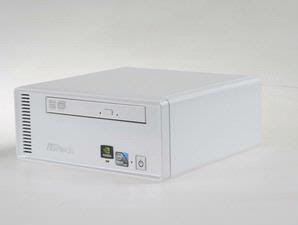
Asrock Ion 330 is one of the few products that pair the Intel Atom chipset nVidia Ion. This product itself comes in the form nettop small size. The price is also cheap (U.S. $ 350), although the records you still have to buy a monitor, mouse, and keyboard separately.

Use of Ion chipset makes this nettop has an HDMI port, one thing that did not meet in the nettop Anad which uses the Intel chipset 945GSE. In addition to HDMI, on the rear panel you will also find an Ethernet, 6 USB ports, VGA Out, and audio ports. At the front, just a DVD Writer, with no USB port or multiple audio as we meet in the PC today. This is quite unfortunate because we have to make a little trouble to install the flash on the back side. Which also should be noted, 2 of 6 USB ports will be used by the mouse and keyboard because there is no port PS / 2 in this nettop.

When first turned on, we were quite astonished to find how the quietness of this Asrock 330 Ion. If there is no indicator light is flashing, we do not know if it's burning nettop. Solved a little silence while we try to play DVDs, but with levels that do not interfere.
Behind the weakness, nettop is proved to have a pretty good performance. Sure, use the Intel Atom processor makes this nettop not suitable when used for heavy applications like video or change the format of rendering images (see test results). But for simple applications such as Office or the Internet, this device does not see a problem. Chipsets and graphics capabilities of any such appointment Ion nVidia: much better than Intel 945GSE. But the chipset is still a jerky when playing videos Full HD (1080i), thus reducing the meaning of the existence of an HDMI port.

One thing that is important to note, Asrock 330 ion can still be overclockable. Through the BIOS menu and OC Tuner software, you can increase the FSB of the Atom 330 processor used this nettop. When we try, can touch the processor speed 2.1 GHz rate, or 30% of the standard speed of 1.6 GHz.

At full-load conditions, power is absorbed ion Asrock 330 only about 40 watts. So to conclude in simple language, this nettop has a slim shape, decent performance, and efficient electricity. A rather unfortunate is the lack of facilities and Wi-Fi memory card slot. Still, we think Asrock Ion 330 could be the ideal solution for home, office, or cafe that needed a compact machine.


Labels:

Asus motherboard overclocking via Mobile

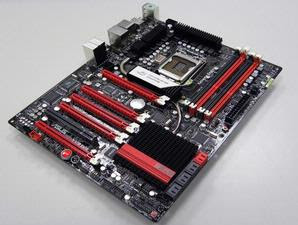
Asus motherboard overclocking via MobileA new history in terms of overclocking Asus has been etched. Series ROG (Republic of Gamers) Maximus Extreme III its Intel P55-based could prove to be overclockable via a Bluetooth-featured mobile phone. This didemokan Asus in front of the visitors that took place DreamHack Winter 26 to 29 November last.

These capabilities thanks to features Bluetooth RC's motherboard allows users to monitor hardware status and change parameters wirelessly through a full-featured PDA phone Bluetooth. This feature also supports the Bluetooth standard functions, such as stereo music playback, Skype instant messaging, Internet access and synchronize your phone / PDA. The process was easy; to switch modes from a standard overclock and just by pressing a button on the rear panel I / O.

Maximus Extreme III, as well as series III Maximus Formula and Maximus III Gene is designed for overclocking enthusiasts and gamers, even carrying ROG Connect. ROG Connect is overclocking interface that allows users to monitor and perform tuning their main system through a notebook or netbook with USB. This is similar to what a race car technician.

However, this latest version to add other functionality, the BIOS update and recovery, see the diagram, and the voltage and frequency settings on the hardware level in real-time. Update BIOS from a notebook is certainly please the overclockers.


Labels:

Packard Bell Easynote Battery Pull

Sunday, December 13, 2009

Packard BellIn Asia Packard Bell notebook may not be much. But in European countries, this product is (was) quite famous. Now occurred the news that the battery problem also plagued the old notebook.

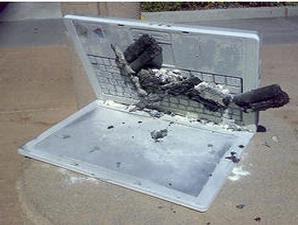
Manufacturer PC Packard Bell announced a voluntary recall of batteries for safety in several of his Easynote laptop. This withdrawal applies to notebooks Packard Bell Easynote MX36, MX37, MX51 and MX52, but only produced between July and December 2007.

Most units are estimated to have affected this issue in mainland Europe. But could be notebooks that have changed hands.

In a statement, Packard Bell said "the battery cells are present in the affected units may have problems that could short circuit causing hot cells and / or burning. There is no risk of electric shock to users. "

However, Packard Bell also insisted, "No reports of injuries (due to it). Company and recommend users to remove the battery and use the grid.
If you want to swap your notebook battery is a long time, you should contact Packard Bell through his official website.


Labels:

Q3, Revenues Up 74 Percent Nvidia

Monday, November 9, 2009

Nvidia has just released their financial statements for the third quarter ended October 25. From the report, noted that the graphics chipmakers from Santa Clara, California, United States had succeeded in raising revenue to 74 percent.

After announcing their financial statements, called the Jen-Hsun Huang, President and Chief Executive Officer of them as "the result of healthy demand from the market in all segments", Nvidia's shares on Wall Street also climbed 7.8% to number 13, 24 U.S. dollars per share.

"Despite having lost market share to AMD, Nvidia was still a good performance," said Kevin Cassidy, an analyst with Thomas Weisel Partners, as VIVAnews quotes from the Wall Street Journal, November 9, 2009. "Selling them, particularly products high end is surprising," he said.

"We continue to get progress in the third quarter with a healthy demand from the market in all segments," said Huang. "Revenue rose sebelunnya than last year, with the increase occurred in each of the PC business, professional solutions, and the consumer," he said.

In total, in the quarter that Nvidia had raised 107.6 million U.S. dollars. In the same period the previous year, the company only managed to get 61.7 million dollars. The company's profit rose 0.6 percent to 903.2 million U.S. dollars.


Labels:

MSI Wind Top AE1900-01SUS, Frame of Life

Friday, November 6, 2009

Caught a glimpse, you might think MSI Wind Top AE1900 is a giant picture frame. Understandably, this device can "stand" for relying on the back of the back like a picture frame. The impression was deepened because of all sides surrounded by clear glass material.

But MSI Wind Top AE1900 is not a picture frame, but the PC All-in-One (AiO PC). Stay plug the keyboard and mouse, this device can be directly used for typing or browsing the Internet. Uh, you do not even need a keyboard and mouse kok. MSI Wind because the screen size AE1900 Top 18.5 "it is a touch screen; same as Asus Eee Top ET 1602. That leaves point, tap, and drag, you can make your favorite computing activities.

To be so easy, MSI provides a special interface called Wind Touch on the operating system Windows XP Home Edition. This application is a direct line to walk when the wind switched, and the function provides easy access to standard applications. There are four tabs in the main menu Wind Touch, the Work, Fun, Tools, and Web. From these names may already be reflected in the contents: Work tab contains shortcuts office applications like Adobe Acrobat, while the Web tab of Internet Explorer.

Unfortunately we can not change or add keyboard shortcuts in the Wind Top. So if you've just installed Firefox, Firefox shortcuts will not appear on the menu Wind Touch. Touch Wind result seems not often used; unless you're satisfied with the applications available.

If you do not intend to use the touch screen, MSI has provided a keyboard and mouse as standard fittings. Keyboard and mouse are USB based, so you have to give up two of the four USB ports available. His own keyboard comes in a full format (full-sized) are characterized by the presence of the numeric keypad and multimedia. But because the size of the keyboard is only about 40x17 cm, the size of each button was a little narrow. A somewhat annoying when we try typing the navigation button (left-right-up-down) are too attached to the numeric keypad.

As of today AiO PC, MSI Wind Top is equipped with Wi-Fi facilities. Other facilities provided are Gigabit Ethernet, memory slot, 1.3 MP webcam, and 4 USB ports. MSI Wind Top is also fully equipped optical device in the form of DVD Writer. When used to read and write data, DVD Writer is rotating smoothly and quiet so as not to disrupt our computing activities.

Because using Intel Atom N270 processor, MSI's performance was not hurried line. For just browsing the Internet or typing, there is no problem. But when InfoKomputer try play video in Full-HD format 1080p, broken images. One thing is unfortunate given the MSI Wind has a wide screen format is ideal for watching movies.
***

Not without reason MSI uses Intel's Atom for this AE1900WT Wind Top. Yes, price is the main reason. Because the price of cheap Atom processor, AIO PC with touch screen measuring 18.5 "dibandrol this could cost U.S. $ 529. Considering the price of the monitor 18.5 "is still around U.S. $ 250an, Wind Top AE1900WT is an attractive option. Although ordinary performance, Top Wind can be a device that frames daily life of your family.


Labels:

Lenovo IdeaPad S10, Cool with Light Screen

Friday, October 30, 2009

Netbook now increasingly mushrooming. Many thanks to people like the light weight and small physique. No wonder if the brand was growing netbook. Lenovo did not want to miss enliven the netbook market.

There are two models offered by vendors that IBM acquired this brand, namely IdeaPad IdeaPad 9 and 10. The first sail 8.9 ", while the second - which we tested - sailing larger, namely 10".

Cute design
Let's see physically this Lenovo IdeaPad S10. Kompas.com unit received a clean white inside and out. Lenovo written in silver metallic color printed in italics on the right side of casing panels. Font-size big enough, so easily read by anyone who crossed in front of you.

This netbook design cute and modern edges without corners. Also look sturdy, as we expect from a big name Lenovo.


But finishing Lenovo IdeaPad S10 is less beautiful in our opinion. Its casing is not glossy white, tend to resemble the PC casing, and a little rough - and although not easy to invite fingerprints, looks vulnerable accumulate dirt and dust. Hopefully, other types of color (black, blue, pink, red) looks more elegant.

In this section
Now let us open the IdeaPad S10. Hinges looked steadily, both ends strengthened with silver chrome ring. A webcam was on the edge of the LCD screen. Nothing more than webcams. Webcam is quite responsive. We of course can take pictures with him.

Yuk alihkah to view the keyboard panel. Well, there's something different here. First, the on / off was not placed on the edge as in most other netbooks, but placed in the middle panel. Placement is quite pleasant. On the right side button on / / off there are three LEDs, one each for Caps Lock, Num Lock, and disk access.

Two other key row, but separate from the on / off on the right side. Paneh labeled orange curve is the OneKey Rescue System which is a typical Lenovo, while computer images labeled with an arch on the left and right will toggle on / off feature Wi-Fi/Bluetooth.

Presence of these two special keys did help us when trying to quickly shut down or activate the feature, mainly because we do not need to press Fn key combination again. Live press a key.

Oh yeah, do not mistakenly assume third place and three button LED is framed by the speaker. Although there are such holes in the speakers, this is not a panel of speakers, but simply the effect of sweeteners.


Keyboard Keys
Rows of buttons on the keyboard panel. The size of the buttons do not belong Wind Notebook U100, but quite responsive even when a knock sounds a bit harsh. Because of space limitations, Numeric Keypad does not appear here.


But can virtual Num Pad activated by pressing Fn + F7 combination. So the U-4 was transformed into numbers, I to 5, and O to 6, J to 1, and M becomes 0. Tab key is made quite small, about half the size of the other letters. This causes a couple of times we missed pressed.


We are also sorry that is where the Shift key on the right side. Placing it under the Enter key often causes us to any pressure. We are also less likely with the placement PgUp and PgDn buttons in the top right - although this may be a problem habit.


Oh yes, there's something unusual on the left palmrest. There is a hole with a microphone logo on it. Yes that is where Lenovo puts its internal microphone. It's where the microphone closer to mouth, but in our opinion not quite fit because the hole was covered with microphone tends left palm was typing.

Multi-Touch Touchpad
Right in the middle of the palmrest, such as Like all netbooks and notebooks, look touchpad area. Its size, when compared to MSI's Wind U100, shorter. But it remains comfortable sliding fingertips here.

It is equipped touchpad Multi-Touch capabilities such as Asus's Eee PC 900. So to enlarge the display (zoom in) photo, we live positioning the index finger and middle finger close together and then expanding. To zoom out, do the other direction. Practical and quick. At the bottom of the touchpad there are two chrome bar that serves as the left and right button mouse.

Left and Right Side
It's finished physical observations in the panel. Let us move to the left side. On this side there is a hole lattice called fan louvers. Its function is to remove heat from the unit.

Right next to the hole that consume a third of that body fester jack where the AC adapter is plugged. On the same side was also a VGA port, multimedia card reader slot, and one USB 2.0 port.

Oh yes, if the SD card (Secure Digital) we enter into the slot multicard reader, part of the card will stand out from the slot. There is no function in the slot this spring, so to pull out our cards to stay interesting part of the card body was sticking.

Let's move to the right side. At present the front of a PCI Express Card slot which is still rare dikemaskan by another netbook. PCI Express Card slot that can be pulled out of this device is used to connect FireWire, eSATA, 802.11n, or even WiMax - of course with the help of Express Card adapter right.

A row to the back row of a headphone jack, microphone jack, a USB 2.0 port and one LAN port. Part of the metal circle this netbook hinge hole, where we pair a safety notebook, aka Kensington lock.

Speaker
Speaker is on the front side facing us. On the left side of the speakers are three LED system: the left is the status of on / off the unit (blue LED), the middle is the battery power status indicator, and the right indicator Wi-Fi devices (blue turns to purple when Wi-Fi on).

Netbook speakers sound quality of this, we think, quite clear, but the volume is less strong. In addition to hiding the speakers, the holes in the front it also serves to help cool the unit.

Screen
This netbook screen size 10 "- no different than the rival bid. But there is a bonus here, which is LED backlit which can save battery power but can also make a colorful display on the screen to life.

This screen resolution 1024x600, but it can also be set to 1024x768. You just have to roll left / right and up / down if you select the resolution.

On-screen display supported by the graphics chip Intel GMA 950 64MB. Lawas belonging chip is indeed capable to handle the usual Windows XP GUI. But the cause 3DMark 2003 score is inscribed not too high, 570. So do not expect to play a game with high resolution in comfort in this S10.

Heat on the Left Side
One is rather our pity. Having used about 10 minutes, palmrest Lenovo IdeaPad S10 began to burn. Heat particularly felt in the left side, and simply reduce the enjoyment of using this beautiful netbook. And on the left side and front, also the bottom of the netbook already have the lattice heat wasters.

But in our test unit, air circulation is less repulsed the heat. Temperature recorded at the left side of the thermometer - as we measure it in air-conditioned room - quite high, 35 degrees Celsius.

Because it is not recommended for this S10 lap for long. There's a good idea to buy a portable folding table (foldable notebook desk) for notebooks made of aluminum which is now being sold as using netbooks outside the office. Or use a notebook cooler.

Software
Not much software at dibundelkan Lenovo S10. Outstanding course OneKey Rescue System, which can be activated by pressing a special button. Existence OneKey Rescue System is a calm heart. Because if Windows chaotic due to virus attack for instance, we live pressing the OneKey Rescue System and the program will detect whether Windows is a mess.

If the kernel file system is damaged, OneKey Rescue System program will ask us to repair the system. We can also automate backups into image, burn it to DVD, and make it bootable with the entire operating system image. The system will reboot after the repair process was completed.

Besides OneKey Rescue System, Lenovo only membundelkan (a pre-install) Windows XP Home Edition SP3, Norton Internet Security 2008, and Adobe Reader 8, and Lenovo Energy Management.

Weight
Compared to similar netbook, Lenovo IdeaPad S10 weight is still reasonable. If the batteries are installed 175gr weight, total weight of this netbook is in the range of 1.2 kg. Not light enough?

But sometimes (or perhaps often), especially if you want to use it for long, we must bring the power adapter and cables. The reason, the S10 battery 3-cell is only able to last about 2 hours, with battery recharging takes 2 hours 11 minutes.

Physically, this netbook adapter is no bigger than the other brand adapter, but cord large enough (and heavy) - similar to MSI's Wind U100. As a result if you want to bring everything (netbook, batteries, cables + adapters), we must be willing to carrying a load weighing 1.61 kg.
***

Indeed, Lenovo IdeaPad S10 is tempting. Slim and attractive design, in other words, cool. Existence PCI ExpressCard/34 slot does it look different from other netbooks. Performance - Office applications and surf - good enough. If only the hot issues that stung enough to overcome by Lenovo. Also be more comfortable if membekalkan Lenovo 6-cell batteries are more durable.

PLUS: cute design; 160GB hard drive; Express Card slot; OneKey Rescue System.

MINUS: Popular; casing easily soiled; 3-cell battery.

Test Results
When compared Axioo Pico specified DJM616A equivalent, Lenovo IdeaPad S10 looks less hurried in playing video / 3D games that require quick acceleration. But durability 3-cell battery was pretty good. Unfortunately Lenovo does not offer the option 6-cell battery.


Labels:

Advan A1N70T, Cheap Netbook

Advan brand initially present only economic notebooks often come with a single characteristic, without dial-up modem. Although it seems less important, the absence of such facilities Advan fact makes the relative price is very competitive compared to competitors. The lack of modern features also make the Advan line of notebook design as a netbook that is more focused on the use of wireless.

Well this year Advan netbook comes in the form of the mobile product line was called a series A. Advan netbook is physically very similar to some brands popular earlier, MSI Wind one of them.

Our suspicion is A1N70T Advan netbook manufacturers produced ODM (Original Design Manufacturer) in which a design is often implemented on some brands. If there is a difference, is located on the layout of the features and functions provided shortcuts.

The design of this market make netbooks Advan as if not having a fast characteristic remembered. It seems like the Advan products as cheaply as possible compared to their competitors, because it becomes about the design that is often overlooked factor that can price as low as possible. Product penetration tactics like this are often plotted raw product from China.

As generally netbook, Advan rely A1N70T Intel Atom N270 processor speed of 1.6 GHz wide bandwidth 533MHz FSB. Other components are similar to any other, such as DDR2 1GB memory, 160GB SATA hard drive, and 1.3-megapixel Webcam. The connection is very common to offer such as wireless and via LAN cable, only without the Bluetooth feature. Screen size 10.2 "which is a netbook trend today, unfortunately the screen does not offer a high angle so that the view is just more comfortable when facing position only.

Wearing Advan A1N70T to type is fun because the keyboard is available to large buttons are easy to push. The opposite occurs in touchpad plus buttons that appear too cute so difficult for you that big fingered as to browse the Web for example, would be more comfortable accessed using an external mouse.

To facilitate its use, Advan add extra shortcut to bowsing, open e-mail (Outlook Express), and also run a media player. Not much indeed, but quite useful.
***


A1N70T Advan performance behavior as well as other netbooks that carries the same runway kitchen, Atom N270. Even if there are different possible only on the use of netbook endurance, in this case the battery capacity. Advan using 4400mAh battery may slightly heartened because countless lifetimes longer than some netbooks we tried. But the main attraction at the sale price seem netbook is a very cheap (about U.S. $ 340-an).

PLUS: great keyboard; extra shortcut; battery endurance; economical price.

MINUS: Design conventional low graphics performance; without Bluetooth.

TEST RESULTS
Both these netbooks are pretty similar specs. Joybook Lite U101 design more beautiful than a simple Advan. However, battery endurance Advan nearly 2X Joybook Lite. That's why Advan use for work and entertainment longer. Comparison of graphic scores both had passed since Joybook Lite with limited memory can not run 3DMark2006 test.


Labels:

BenQ Joybook Lite U101, Netbook Full Power

The limited dimensions of netbook makes this product so hard to develop more features, it is easy to see the limitations of input-output connections in the netbook. Almost all netbooks have limited input-output so that characters featured InfoKomputer difficulties each product, let alone three specifications of the components connected to each other money.

But some players seem netbook standard are trying to get out of the standard. If it is difficult to change specifications of hardware (such as processor, RAM, hard disk, or input-output), then increased durability and external display (finishing) should be a telling step. This is done through besutan netbooknya BenQ, Joybook Lite U101.

Joybook Lite U101 which was introduced late last year was such a cursory memamng netbook general, small and offer input-output constraints. However, BenQ's unique approach: the screen is made in sizes 10.1 "which makes berasio 16:9 screen resolution up to 1024x576 pixels, a little more flat, which according to BenQ is more ideal for watching movies. Kind of funny too because the function should not be positioned netbook for multimedia spectacle is not it?

To remove the impression netbooknya frail, BenQ U101 skeletal structure designed in such a way that could hold weight up to 50kg. Netbook claimed will not be damaged even if dropped from a height of almost 1 meter when you're burning. Great is not it?

To be part of the screen and no blisters around the keyboard placed balls from the rubber pads that function as well as the weight of the cover to prevent friction with the main body of the netbook. Is also interesting, the cover / cover that appears in the icon character emotions IMR faceplate coated materials that are resistant to scratches. This is one netbook designed with the advanced physical toughness.

Judging from the specifications, Joybook Lite U101 is not much different between the rivals such as the use Intel Atom N270 and DDR2 memory is only 512MB. Limited memory capacity of this makes the test session through 3DMark2006 graphics can not run smoothly. U101 variants of LE04 are only using 512MB standard DDR2 memory, but the purchase of this unit will get a free memory upgrade to 1GB. Model that InfoKomputer try the SIM slot is provided for Internet connectivity / data via the internal modem HSUPA 3.75 G, but not yet installed modem module, alias is optional.

Besides relying on endurance, Joybook Lite U101 has several other advantages. This example display with LED background that gives a clear view of the quality of the speed display until 8milidetik to be more comfortable in the eye. Convenience for users is also increased thanks to the keys diperbesarnya reach 90% the size of conventional desktop keyboard - how similar is also done by other manufacturers so that users do not get tired of typing with the dimensions netbook is somewhat narrower.

HC Danny Yao, Vice President of BenQ for the Asia-Pacific stated that the Joybook Lite U101 is made with a unique touch to be able to be different than similar products, for the U101 does not solely rely diusungnya hardware specifications. The kitchen itself was implanted using U101 Intel Atom N270 processor, DDR2 memory is 1GB, and 160GB hard drive and a Wireless connection facilities and an ethernet LAN. A more complete option also offers Bluetooth 2.0 connectivity and an internal modem HSUPA 3.75 G. For the Indonesian market, Joybook Lite U101 will be available in a choice of operating system Windows XP Home for U.S. $ 579 or Linux for $ 479. Models with Linux will have a graphical user interface (GUI) personal interest that is easy to use.
***


Actually there is nothing disappointing in use Joybook S33-LE03 for daily activities such as office computing and the Internet. The ability of the test results showed a slightly better than notebook processors are still wearing T series But even better than X3100, X4500HD graphics performance on Intel Centrino 2 is still less shot for 3D gaming on Windows Vista. But the S33 is more ideal for work, not play 3D games.

Price S33 Linux bersistem reached U.S. $ 999 may be less attractive, but the BenQ gives more value through the 3-year warranty period and all-risk insurance 1 year.

PLUS: stylish design and light weight; and widescreen LED display; the framework of strong, big keyboard; anti-scratch cover.

MINUS: Endurance batteries; without Bluetooth.


TEST RESULTS
Netbook Intel Atom is more ideal to use the Linux operating system or Windows XP so that their performance is not oversized. In comparison, the ability Joybook Lite netbook and A1N Advan actually the same. What distinguishes wearability only highly dependent capacity batteries. But if you put the beauty and physical strength of the Joybook Lite U101 is still superior, even compared to other competitors.


Labels:

BenQ Joybook Lite U121 Eco Friendly

Invita a cada persona para mantener la sostenibilidad ambiental de esta tierra amada no es cosa fácil, sobre todo en el centro de un estilo de vida moderno, que a menudo aumentan el consumo de recursos naturales. Papel de los actores de la industria es muy importante recordar aquí los productos que producen son a menudo tomadas de la naturaleza y pueden afectar a llevar el estilo de vida humana. A través de la netbook nueva serie, Eco Joybook Lite U121, BenQ proporciona un ejemplo de cómo la industria puede cuidar el medio ambiente.

Joybook Lite U121 estaba todavía con el eco el diseño básico de un netbook se fija en el procesador Intel Atom y otros servicios estándar, tales como Wi-Fi y un diseño elegante. Para que otras soluciones se podrían desarrollar con el fin de ser diferente o mejor que los competidores, uno de ellos utilizando las cuestiones ambientales. Algunos de los beneficios que usted podrá disfrutar de interesantes U121 Eco, donde el más convincente es la durabilidad de batería de 6 celdas que llegó a 8 horas (modo económico) y la recarga tarda sólo 1 hora para llegar al 80% de su capacidad. La resistencia y la velocidad son claramente de relleno encima de la media competidores netbook.

Para ahorrar energía, la utilización de la CPU Eco U121 Atom Z530 serie que a pesar de sus características de rendimiento similares a la N270 (ambos 1,6 GHz con FSB de 533MHz), pero el Z530 tiene un TDP (Thermal Design Power) está a sólo 2 vatios. Esto significa, Z530 niveles TDP inferior a 0,5 watts de un netbook N270 hace ser más eficiente de energía y calor no superior a 2,5 W TDP en Atom N270.

LCD de 11,6 ", que utiliza sistemas de iluminación LED de bajo uso de energía. Debido a que estos diseños U121 poder absorbe un 40% menos que los modelos anteriores. La palabra "Eco" en este netbook se refleja a través de la utilización de materiales respetuosos del medio ambiente para los componentes mecánicos del 75% en este netbook se pueden reciclar.

Si el predecesor de la serie (Lite U101) se describe como una poderosa netbook o mantener forjado, Lite U121 serie es en realidad parece más débil, pero todavía ves hermosa por dentro y por fuera. Frágil aquí puede ser interpretado como una advertencia a nuestro medio ambiente.

Dos opciones de color son realmente prestado por invitación de BenQ de cuidar la naturaleza como del océano azul que nos recuerda a proteger el mar de la contaminación, la basura y los colores blancos representan el hielo polar comenzó líquido en parte debido al calentamiento global. A pesar de su empresa de diseño visual de parecer menos preocupación por el sentido natural, pero lo que BenQ designado para probar esta nueva netbook es un buen ejemplo para todos nosotros.

***


Entonces, ¿cómo la capacidad de Eco Lite U121 propio? De los resultados de las pruebas que hacemos, al parecer en el procesador Z530 netbook es todavía un aspecto similar a la N270 anterior. Pero desde que uso US15W chipset Poulsbo que inculcó el chip gráfico GMA500, por lo que no mejora el rendimiento visual al tiempo que aumenta de manera significativa.

Lo que es sorprendente es clara en el uso de energía de la batería promedio llega a más de 5 horas. Evidentemente, este netbook responder a sus necesidades de informática móvil y la actividad de Internet (a través de conexión 3G) es más, su apoyo a las cuestiones ambientales también son interesantes, que no son adecuados ignorado.

Además: diseño atractivo, el alivio de la pantalla, los materiales respetuosos del medio ambiente; conexiones completa, buen rendimiento de los gráficos, el apoyo de la solicitud; baterías duraderas.

Menos: No ranura Express Card, información y función de indicador es menos clara.

RESULTADOS DE LA PRUEBA
Aquí comparamos las diferencias en la capacidad de utilizar el procesador de Lite U101 N270 y Eco Lite U121-CPU que se Z530. Su funcionamiento es similar pero con importantes ventajas en el proceso de codificación de audio y un poco más sobre los gráficos. Sin embargo, la capacidad de una batería de 6 celdas a la Eco Lite U121 ganó de manera perfecta para aquellos que buscan una solución duradera netbook.


Labels:

A10216 Mantis Cocoon Elevo, ahora con el módem 3,5 G

Para responder a la demanda de los usuarios móviles que necesitan una conexión a Internet en cualquier lugar, ya se ha completado Elevo Mantis serie Cocoon con su 3,75 G módem HSUPA (High-Speed Uplink Packet Access). De esta manera, los usuarios pueden fácilmente a la Internet sin la necesidad de instalar un módem externo a veces es inconveniente.

Aunque se menciona como una nueva serie (A10216 tipo), el diseño y las instalaciones de esta netbook como el modelo anterior que no fue acompañada módem HSUPA. Las diferencias que surjan, además de módem 3G adicional es la mayor capacidad de memoria de 2 GB y 2 baterías de capacidad (4400 mAh). Ambas actualizaciones están obviamente muy medios para mejorar la capacidad de resistencia y su uso.

Para apoyar las actividades diarias, Mantis Cocoon A10216 instalaciones equipadas con LAN inalámbrica, y webcam de 1.3 megapíxeles. Conexión Bluetooth también está disponible aunque se presenta en un dongle independiente que se conecta en el puerto USB para que pueda.

Al igual que otras netbooks, el dispositivo está equipado con sistema operativo Windows XP Home Edition. El precio ofrecido era muy competitivo en su clase. Para ser más atractivo, distribuidores Elevo también proporcionan 3-el servicio de garantía años y piezas de repuesto. Esta oferta es ciertamente atractiva que sus competidores. Sin embargo, Elevo debe encontrar una manera de luchar con los primeros jugadores en la asistencia.
***


Si usted está buscando netbook basado en Intel Atom, con una especificación bastante completa, Cocoon Elevo Mantis de este A10216 convertido en una opción atractiva. El aumento en las instalaciones de modems HSUPA, la memoria y la capacidad de la batería para apoyar los puntos superiores de las actividades de trabajo y la Internet. Sin embargo, debido a la todavía utilizan el Atom N270 CPU, este dispositivo no puede realizar, excepto en una pendiente pocas capacidades de gráficos, y el tiempo de uso de un netbook de largo.

PLUS: buena vida de la batería; hay módem HSUPA y 2 GB de RAM.

MENOS: Bluetooth Dongle necesario, pesa 200 gramos aumentó.


PUNTAJE DE EVALUACIÓN
(máximo 5)
Rendimiento: 3.75
Instalaciones: 4.3
Modo de uso: 3,8
Precio: 4
PUNTAJE TOTAL: 3,97


RESULTADOS DE LA PRUEBA
Mantis Cocoon Elevo presenta la nueva batería y la RAM se duplica. Las baterías producen resultados más durabilidad que su predecesor (Mantis A10116). Pero los resultados de otras pruebas no difieren mucho porque el procesador sigue siendo el mismo realizado.


Labels:

A10216マンティスコクーンElevo、今モデム3.5 Gとは

今彼の3.75 ĜモデムHSUPA対応(高上りリンクパケットアクセス速度)Elevoマンティスコクーンシリーズが完了すると誰でもインターネット接続が必要、モバイ ルユーザの要求に答えるために。この方法では、必要な外付けモデムをインストールすることなく、インターネットをすることができます簡単にユーザーにも不 便です。

ただし、新シリーズ(タイプA10216)、デザインとHSUPAのモデムが付属していないていた以前のモデルのように、このネットブックの施設 として言及した。は、追加の3Gモデムに加えて、発生の違いは、2GB以上の2倍容量バッテリー(4400外国特例)に増加し、メモリ容量です。が明らか に非常に耐久性、パフォーマンスと使用効率を改善するための手段の両方のアップグレード。

日常的な活動、カマキリコクーンA10216設備、無線LANを搭載し、1.3メガピクセルのウェブカメラをサポートする。ただし、別のドングルで示さBluetooth接続も利用されているUSBポートを有効にするプラグインすること。

他のnetbooksと同様に、デバイスのオペレーティングシステムがWindows XP Home Editionを備えています。価格で提供して非常にそのクラスでの競争力だった。より魅力的にするために、Elevo販売代理店も、3年間の保証サービ スおよびスペア部品を提供する。このオファーは確かに競合他社よりも魅力的です。しかし、Elevo出席の最初の選手と戦うための方法を見つける必要があ ります。
***


場合は、インテルAtomは、かなり完全な仕様をベースにネットブック探している、繭ElevoマンティスこのA10216の魅力的な選択肢とな る。施設の増加は、HSUPA対応モデム、メモリ、およびバッテリ容量の作業活動の優れた点とは、インターネットをサポートする。しかし、まだCPUのア トムN270を使用するため、このデバイスは、いくつかの優れたグラフィック機能を除いて、実行することはできませんし、時間が長いのnetbookを使 用します。

プラス:良いバッテリー寿命;がHSUPA対応モデムおよびRAMの二ギガバイト

マイナス:Bluetoothドングルが必要、200グラム増加した。


得点査定
(最大5)
パフォーマンス:3.75
設備:4.3
使用方法:3.8
価格:4
合計スコア:3.97


テスト結果
カマキリコクーンElevo倍増され、新しい電池とは、RAMを示します。その結果、電池は、前任者(カマキリA10116)以上の耐久性を生成します。しかし、他のテストの結果もこれは、プロセッサがまだ実行と同じです違いはありません。


Labels:

HPのProBook 4411s、パーフェクトバランス

HPのEliteBook、およびHPパビリオンの間に、我々 ProBook表示されます。そのため、おそらく右の様式は、このProbook HPのクラスを記述する。だけを思い出させると、HP EliteBookはビジネスクラスのノートブックのビジネスの生産性を備えた施設をサポートする設計ですが、保険料で償還する必要があります。対照的 に、唯一の標準的な設備と手ごろな価格では、HPパビリオンノートブック。まあ、HPのProbookそれの最中だった。価格は比較的手頃な価格であり、 同じクラスの施設、ビジネスノートブック整っています。

このProbook HPの4411sは、例えば、米国の価格は899ドルしています。これにより、グラフィックスカードATI HD4330、およびWindows Vista Home Basicを独立したインテルCore 2 Duo T5870(2GHz以上)、250 GBのハードドライブに含まれています。まだ米国のための安価なバージョンは$ 799、これは色から別のことです(光沢/ノワール)と黒のグラフィックカード(オンボードインテルGMA 4500MHD)。

ただし、競争力のある価格でdibandrol、HPはまだProBook 4411s機能ビジネスノートブックしています。例では、ハードディスクが削除を保護したり、動揺は、3D DriveGuard施設です。ソフト面では、HPファイルsanitizerの保証を提供することを完全には全く跡形もなく消えて削除したいデータで す。

しかし、ProBookのQuick Lookの中で最もユニークな施設2と思われる。ときに、電子メールや仕事のスケジュールは、Windows VistaとOutlookを起動しに行く気にしないでくださいを参照してください。あなただけのクイックを入力してボタンを電源ボタンの横にあるを押す と2見て必要があります。秒以内に、Outlookのデータにアクセスすることができます。

どうやって?実際には、クイック2見て、Windowsの外の特別なオペレーティングシステムです。だからときには、クイック2見て押すと、シス テムは、特定のオペレーティングシステムに入力されます。電子メールとその中のデータは、実際に肖像画や、メインのデータを反映してOutlookの。 データが"ポートレート"にするか、設定メニューでは、ときに自動的にOutlookを起動さを決定することができます書き換えます。

際には、クイック完璧なもの2見てみてください。このメニューに入力するには、私たちは、約12秒かかった。電子メールデータ、連絡先、 Outlookからスケジュールをクイックで完了モード2で見て表示されます。データの書き換え処理と迅速されたシステムに負担を感じていません。

これは有用な質問をされる場合があります。データクイック2は、この本質的にはBlackberryと他のスマートフォンができるか見てください。だからかどうかは、ハンドヘルドデバイスのできる何かを行うにはノートPCがありますか?自分の責任を持っ。

また、このProBookの物理的な外観について自分の意見があります。しかし、我々の意見では、ProBookのHPが表示さはかなりクールで す。えび茶色(または長期メルロー)と呼ばれますが、それでも権威軽薄に見えた。しかし、HPのEliteBookとは異なり、マグネシウムから作られた 合金、ProBook HPの筐体プラスチック製のものです。

それでも、固体ケーシングの物理的な品質。私たちが画面の(または裏面)が表示されない波やしわになり、画面上のノートPCの背面側のキーを押し ます。これは、ケーシングに十分な画面の後ろ側からの圧力に耐える強さを示しています。もう一つ注意すべきマイラーの薄い層の防水性のおかげでキーボード が保護されます。といってもキーボードを浸し、水がノートPCや有害なコンポーネントの内部の内部に入ることはありません。

問題がある場合は、HP独自のサービスを開設&リターンサービスピックアップと呼ばれるしています。ですからProBookノートブック問題が発 生する、あなただけの改善の目的のために取られる、HPのサービスセンターとノートPCを呼び出します。完成した場合、ノートブックはあなたのアドレスに 戻って配信されました。
***

しかしマイナス指紋スキャナーは、HP ProBook 4411sビジネスのためのノートPCとしての自分のアイデンティティを見ることができる。パフォーマンス、素敵な固体のケーシング、グッドや販売後の保 証を甘やかすサポート。しかし、最も重要な、そのクラスのノートPC向け競争力のある価格でこのノートブックdibandrolです。だから場合は、 ProBookのHP 4411sオプションをすることができますお手ごろ価格で、強力なノートパソコンが必要です。

プラス:生産性アプリケーションの多くの支持;快適なキーボードが良いデザイン。

マイナス:重量;指紋スキャナーを備えていない。

得点査定
(最大5)
パフォーマンス:3.7
設備:4.1
を使用する:4.35
価格:4.1
合計スコア:4.03

テスト結果
独立したグラフィックスカードで武装し、パフォーマンスをProBookのHP 4411s良いのは3DMark 2006のテスト見ている。他のテストでは、その性能は、ゲートウェイTC7806nに似て、バッテリ寿命時には1.5時間以上に達し、HDムービーの再 生を含む。


Labels:

Bee Zyrex 103G Netbook with Cellular modem

Tuesday, October 20, 2009

These days more and more netbooks that includes an internal cellular modem as a standard completeness. MSI Wind U120H addition, there Zyrex Bee 103G. In this Zyrex netbook, the internal modem is behind the battery, and embedded deep in the so InfoKomputer not know the brand of modem. But certainly, this modem works on the path and supports standard GSM HSDPA (3.5 G).

When InfoKomputer try using Axis network, internal modem successfully 103G Zyrex Bee 0.25 MBps speed record for a local server. In comparison, the test with an external modem Huawei 160G recorded 0.29 MBps. Thus, the quality of the internal modem can be relied upon.

Outside the presence of 3G modems, this netbook also has some features that are rarely met in other netbooks. The first is a Bluetooth facility, while the second facility is a dial-up modem. We're not sure the last facility is still some use, but this netbook at least provides a variety of connection options.

If the side of outstanding facilities, the performance of this netbook is practically no different from the netbook available today. This can not be separated from the combination of standard components used by the majority of the current netbook, namely the Intel Atom N270 processor, Intel 945GME chipset, 1GB DDR2 memory, PC800, and the 160GB IDE hard drive. When compared with the MSI U1000X, we can see the equivalent performance.

Likewise in the endurance test in the battery mode. Although using size 3600mAh battery (under the MSI using 4400mAh battery), this netbook can last about 3 hours when playing 720p HD video. The times are entered in the ranks of top class of all netbook ever InfoKomputer test.

But about wearing comfort, this netbook is troublesome. The main problem is the size of its keyboard keys are very small. If counted, the size is only about 16x12 mm with a distance of less than 2mm. Compare with HP Mininote - ternyaman current netbooks - which has a keyboard key sizes around 17x16 mm. Because of the size and spacing of the keys are too close, InfoKomputer difficulty reaching speeds of our standard type. As a result, one push and one type is a common problem.

Beyond that, InfoKomputer not see a problem in terms of wear comfort. His touchpad was responsive, so that was easy to navigate the entire contents of the screen. Monitor is also able to provide accurate color, although vieweing on the vertical angle was narrow. But with the weight of 1.4 pounds, this netbook is relatively heavy compared to other netbooks.
***

Thanks to the presence of cellular modem in it, Zyrex Bee 103G is a practical mobile devices and can be relied upon when traveling. The price itself around $600, so it is still slightly more expensive than the combination of netbook Zyrex "plain" ($450) and an external modem (less than $100). So depending on your taste: a practical or economically?


Labels:

Blogger Theme By:Google Android .