Home | News | Android

Archive

. . . . . . . . . . . . . . . . . . . . . . .

Free Download Yahoo Finance to Blackberry

Thursday, January 21, 2010

Free Download Yahoo Finance to BlackberryYahoo Finance is the leading internet business services. With Yahoo Finance services, we can get the latest economic news. If we are always mobile, the Yahoo Finance services can be read on the Blackberry. In This time, Yahoo Finance services in the Blackberry is only available in UK.

Hopefully in some time later will be available in many languages. Besides getting the latest economic news, with the Blackberry Yahoo Finance application we can perform a variety of other features such as:
  • Exchange various currencies
  • Financial new aggregator
  • Statistics
  • Real time data and after market analysis
  • View our Yahoo Finance portfolio, and more
The application of Yahoo Finance can we downloaded for free on our Blackberry. Yahoo finance applications available for all types of Blackberry. For free download Yahooo Finance application for Blackberry, please click here.


Labels:

Get Cheap Notebook Computers Today

Many people prefer to use a notebook computer, more simple and easy to carry anywhere while doing activities outside the home such as a school, college, office and so on. Previously I use a desktop computer, my job does not become simpler when the data needs a job so I had to go back to the desktop computer. But this time I have been using a notebook computer that I always carry when mobile, and important data can be quickly will I find when needed. Lucky for us who have been using a notebook computer, the work can be done anywhere with a different atmosphere.

Using a notebook computer that has a large capacity would be nice, we can store and access data much faster when running applications. The greater capacity also the price of expensive, but it needs to be considered for many applications today run with large memory needs. Each laptop has a capacity different, if capacity is available as RAM or hard drive is not large, we should use the appropriate operating system for it, because if the hardware is not eligible notebook minimum access time will be longer and a lot of our time is wasted to wait for the completion of the process.

Today we can buy a cheaper notebook computers than ever before and the price is not much different from desktop computers. Computer companies vying to expand notebook computers, various brands and styles of notebook computers so tempting for us to have. The development of technology for notebook computers require components maker to create new innovations, battery life was only up to 6 hours but now the time to reach 8 to 12 hours, and this was confirmed by Sony and Samsung notebooks. Performance notebook computers are supported by battery power which can last long is suitable for you who are always mobile.


Labels:

Free download Paypal applications on Blackberry

Wednesday, January 20, 2010

Free download Paypal applications on BlackberryPaypal, one of the leading payment services on the internet announcing that applications created for the transaction through the Blackberry have been finished and can be downloaded for free.

This service is similar with internet banking that was popular a few years before. With this application, the Blackberry users can be quickly send money to whoever he wants, as well as check balances and payment history.

The most fun for us, the Paypal service can be downloaded for free. Although free, this service can be enjoyed Blackberry users in Canada, United States, United Kingdom, France, Italy, Spain, Holland, Germany, Belgium, Luxembourg, Ireland, Portugal and Australia. We hope in the future time will increase again.

If your Blackberry user and want to immediately activate the paypal application, please click here. I hope the information about the free download Blackberry application from paypal can be useful for us.


Labels:

Time to Relax while Watching a Movie

Watching is one of my favorite especially for the movie that has a challenge. Watching car movie with a challenging scene made me a little tense. This tension occurs when I watch the car movie that shows the rider the skills to do the dangerous scenes. they played with safeauto, with an amazing variety of styles, and there are funny scenes like in the movie Smokey and the Bandit. Here you can also watch other films from safeauto best of all time. The scene of police cars that jumped to cross the bridge so amazing you can watch the Blues Brothers, Bullitt, Thunder Road, and American Graffiti.

Relax while watching the best movies would be nice, they are playing in action movies with car looks so enjoyed not seen one bit of tension from their faces. Doing a scene with unsafe cars would be detrimental to anyone who drove, but the auto insurance something they did become more relaxed and at ease without the burden. For those of you who have not used safeauto will certainly make you worry when the highway was crowded street, where other drivers might do something that hurt us scraped or hit by a car behind us.

I have little time to relax because it was so crowded schedule to complete what will be done. By spending a little time for entertainment by watching the best movie cars will certainly make our minds become more fresh. For those of you who want to do a scene like that should be auto insurance to protect the loss that might occur.


Labels:

Nexus One is Favorites Gadget Steve Wozniak (Apple founder)

Sunday, January 17, 2010

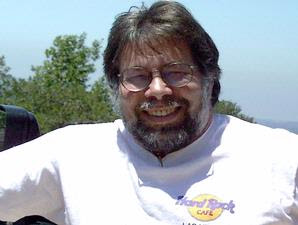
Steve Wozniak (Apple founder)SAN FRANCISCO - Who would have thought Steve Wozniak, Apple cofounder Steve Jobs but now even making phone made by Google's Nexus One, as the current choice. This was revealed Wozniak in an interview with NBC television network.

"The latest, and not a product developed by Apple, just out yesterday," Wozniak said when asked about his favorite gadgets such as the Telegraph quoted the site, Friday (15/1/2010). The answer refers to the Nexus One. In addition, he also has a Motorola Droid are also both working with the Android platform.

However, instead of praised Android platform. He admitted that he had to use Android-based smartphone since the first version came out but not satisfied. "I have some Android phone, which earlier did not satisfy me. Droid and Nexus One, including a great phone, but do not apply to all Android," he said.

In fact, Wozniak said hundreds of types of smartphones have a variety of brands including Motorola VIP phone from the 1990s that are not sold freely on the market. Surely, he promised to buy every new gadget that caught his attention. Wozniak claimed to have tried to make the BlackBerry as the main gadgets for everyday activities. However, again he was not too happy.

"Sometimes I bring a Droid at the waist and also Nexus One. At a certain moment I took my BlackBerry. The main phone I kept the iPhone," said Wozniak. Not only one iPhone will have but two.

When asked where the gadget is best thought there was not the best. According to him, it all depends on consumers' needs and abilities. Wozniak had even criticized the initial version of the iPhone does not support 3G, is not open to the developers, and often put to hack his iPhone itself in order to run various applications.


Labels:

Changing Windows Standard Fonts

There are several standard fonts used by Windows, the Arial and MS Sans Serif. Tahoma font used on the shell to Explorer in Windows, while the system default font such as the System Properties, Device Manager and other applications is MS Sans Serif.

Want to change these fonts? The way is not as easy as changing the font in Microsoft Word document. But, if you're already accustomed to playing with the registry, do not hard, really.
  1. Click "Start> Run ...", then type" regedt32.exe ".
  2. Go to the subkey "HKEY_LOCAL_MACHINE-SOFTWARE-Microsoft-Windows NT-CurrentVersion-FontSubstitutes".
  3. Double-click String Value MS Shell Dlg "to change the default font of the previous system using Microsoft Sans Serif.
  4. Change the Value Data it with another font type you want, provided that fonts are already installed on your Windows.
  5. Click "OK".
  6. Double-click to "String Value MS Shell Dlg 2".
  7. Change shell before using the font Arial with font type, such as Arial or Comic Sans MS. The rules remain the same as before, ie you define the font must have been installed in the operating system.
  8. Click "OK", then close the Registry Editor and restart the PC.
After you restart your computer, Windows will use the new font you have set for the font in the shell or in the system.

Do not forget, do a registry backup before you try this trick so you can return to the previous settings with ease. To manually system restore, went back to the subkey "HKEY_LOCAL_MACHINE-SOFTWARE-Microsoft-Windows NT-CurrentVersion-FontSubstitutes" in the registry, and then return the "Value Data MS Shell Dlg" Microsoft Sans Serif and "MS Shell Dlg 2" in Tahoma.


Labels:

Modifications Microsoft Word Shortcut

Modifications Microsoft Word ShortcutIf you click the icon [Open] or [Save] on the toolbar of Microsoft Word, comes the dialog window. In the middle, you can browse the disk to determine the location of the file. On the right side there is a preview of the document will be opened, while on the left side there is a shortcut to the Desktop, My Documents, History, Favorites, and Web Folders. Presence of a shortcut that allows us to quickly access a particular location.

Unfortunately, documents to be saved or opened are not in the places of his shortcuts are done. Just delete the existing shortcut and replace it with a shortcut to the folder that is frequently used.

You can remove the shortcut through the registry like this:
  1. Run the Registry Editor.
  2. Go to KEY_CURRENT_USER key sub-Software-Microsoft-Office-9.0 Common-Open-Find-Places-StandardPlaces. Inside are five keys, ie Desktop, Favorites, My Document, Publishing, and Recent. Key that create the shortcut on the windows "Open / Save" on your Microsoft Word. Key Desktop, Favorites, and My Documents refers to the shortcut Desktop, Favorites, and My Documents, while referring to the key shortcut Publishing Web Folders, and refer to key shortcut Recent History.
  3. Say you want to remove the Web Folders shortcut. Go to the key Publishing. double-click the DWORD value named [Show], changing its value data to "0".
  4. Now try to open Microsoft Word and click the icon [Open] or [Save]. Supposedly, the Web folder shortcut is not there. To eliminate the other shortcuts, you can do so on other key key in accordance with the shortcut that you want to remove.
If you had been able to eliminate unnecessary shortcuts, so now let's learn to create their own shortcut that will refer to realize favorit.Untuk folder, open the Registry Editor again and follow these steps.
  1. Go to sub key HKEY_CURRENT_USER-Software-Microsoft-Office-9.0-Common-Open-Find-Places.
  2. Create a new key with the name "UserDefinedPlaces".
  3. In it create another key with the name, eg "shortcut1".
  4. Shortcut1 key in the string value is created with the name "Name", and fill its data value with the name of your choice. This name will appear on the Open or Save the window in Microsoft Word.
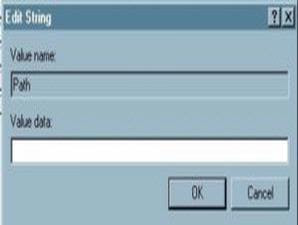
  5. Then create a string value again and this time give it the name "Path". Fill in the value of his data with the full address of the folder you want to create shortcut it.
  6. Try again to open the windows Open / Save, and the shortcut you made earlier will be seen there.
You can make your favorite shortcut is more than one. Need to be aware, however, a maximum of only five shortcuts that can appear on the windows Open / Save, already includes the standard shortcut from Microsft Word. So if you want to make a favorite shortcut, you must remove one of the standard keyboard shortcuts Microsoft Word. If you want to make more than one, of course you also have to remove the default shortcuts Word more than one.


Labels:

Blogger Theme By:Google Android .